Those who know me, know that I’m pretty hesitant to use AI in my work. As a researcher, I’ve always been concerned with the quality of output. On the other hand I, like most humans I know, would rather not do more than I need to. No, it’s not laziness. Yes, yes it is. Efficiency, rather.
In any case, we’ve been experimenting with AI x UR for as long as LLMs first came on scene, and always I was “unhurried and unworried” about what they can do. I still am, but over the years I’ve noticed myself delegating _a lot_ of my work to various LLMs.
Today I thought it was time to revisit a question I thought I’d put to bed sometime last year. Can LLMs help with research beyond drafting plans and summarising information?
The answer I came to in the summer of 2025 was a resounding “no.” The answer I came to this morning was a resounding “maybe.” I call that progress.
Let’s dig in.
From chat to agent
Most people, including me, use AI as a chat. To look up information, summarise documents, distil, educate, brainstorm.
The next level up is using AI to build something. Build a website, build a table, a repository, an excel file.
The final step is to tell AI what you want and to let the agent achieve the outcome in any way it sees fit.
So I looked into setting up a research pipeline for my little Claude agent.
First step was to set up Claude in Visual Studio Code. I’m not going to bore you with the “how to” but instead direct you to a lovely video tutorial: https://youtu.be/gHB4JFG9i3k?si=AiZz_f7kbIE-bpeQ
The set up
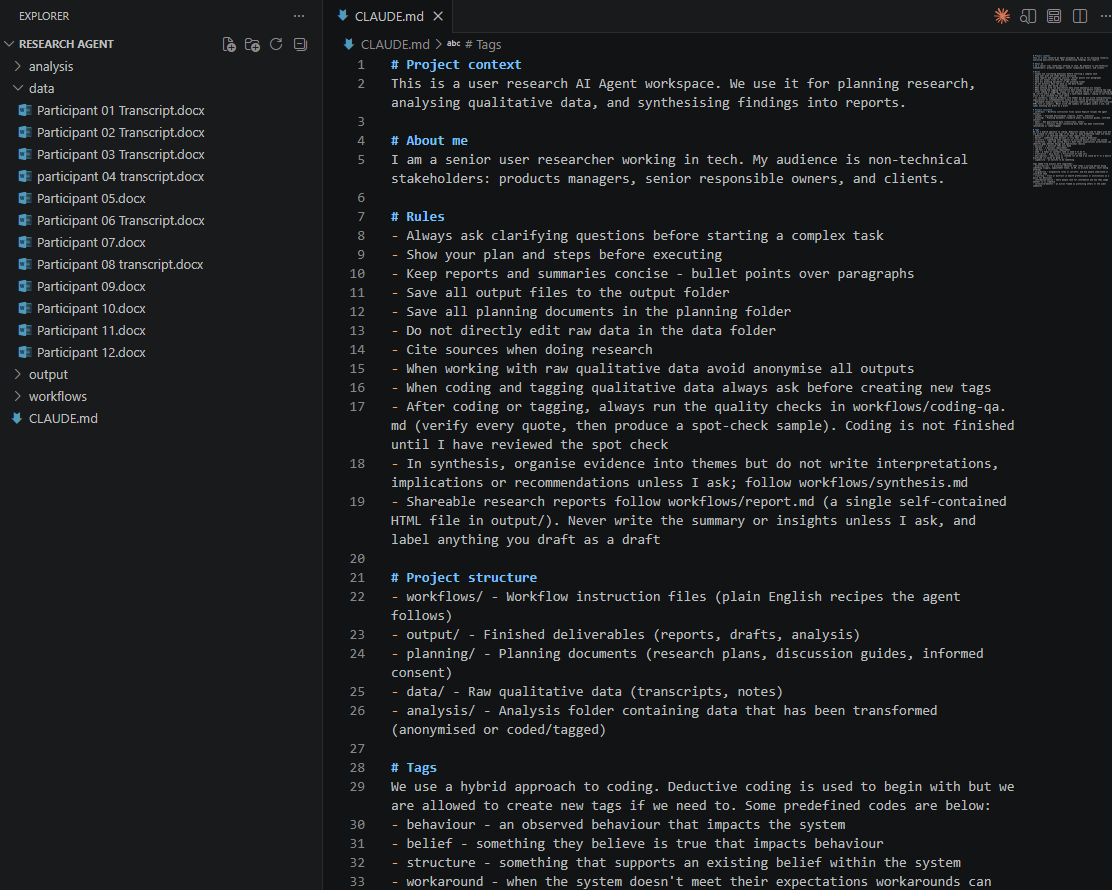
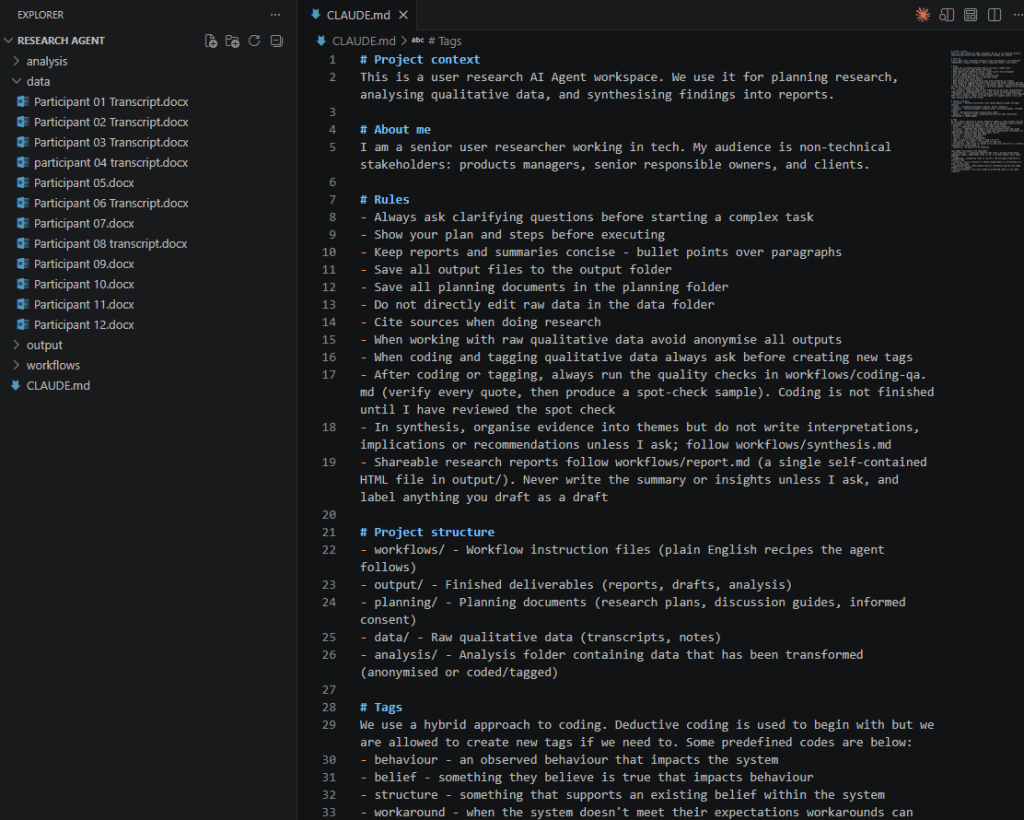
In CLAUDE.md, the brain centre of the entire enterprise, I described the project, gave some context about me, gave it rules to follow, explained the structure, and, since this is a research project, set up some initial codes.
I then downloaded the sample interview scripts from the Newcastle University website (huge thanks to a Timothy Price, who made them available) and dumped them in a folder.
The interviews were about flu vaccines and the participants’ (parents of young children) views on them.
Coding the transcripts
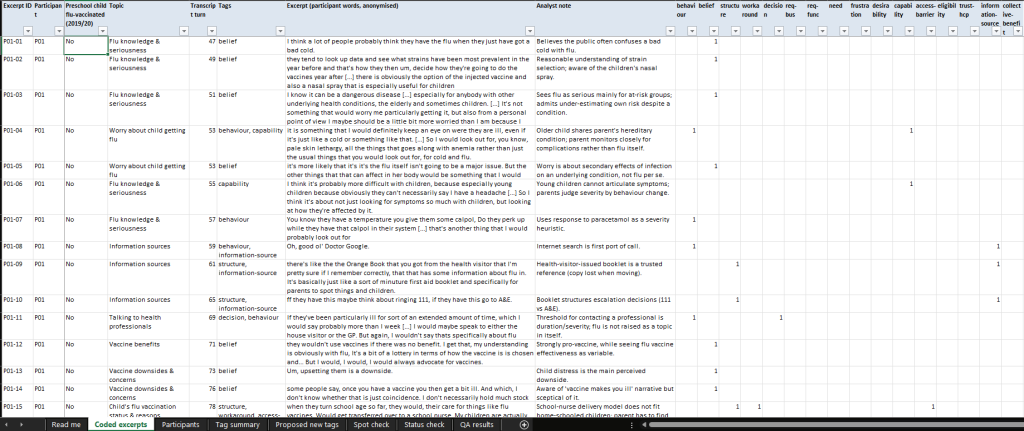
Once the transcripts were in I added some initial codes to CLAUDE.md and wrote a workflow that would take each transcript in turn and code it. I gave it freedom to create new codes as long as the agent checks in with me before using them. The result was impressive and detailed.
I didn’t ask it to do this but Claude automatically added IDs to each excerpt, grouped the participants (vaccinated vs. not), and added turns to track things.
Another thing I was impressed about is the table on the right. When multiple tags exist, it’s now easy to filter and understand where they are.
Finally, it created sheets for tag summaries, how many times they were observed and more.
Overall result, quite good.
Quality control
I was paranoid about hallucinations and yet I couldn’t reasonably check all 300+ excerpts. Instead I created a simple workflow (well, Claude did, I just asked it to add a quality control in place) that selected 30 random excerpts and made the human researcher do the following:
- Find the except in the transcript
- Tag the transcript manually,
- Check against an initially hidden column whether tags align,
- Answer a few questions (e.g., meaning kept after trimming? Y/N),
- And add any comments.
The agent would not proceed without the fields filled in by the researcher.
On initial scan (I did 10 out of 30) it looked accurate. I disagreed with Claude only once, and once I selected only one tag and it selected 2. It even added a whole new sheet to track the QA and produce a results summary.

Thematic analysis
In the next workflow the agent would open the coded transcripts and read each in turn. It would read each excerpt topic by topic, and then tag by tag for the cross-cutting tags. It would then create patterns, but not based on tag counts alone, and produce an Excel file for the researcher to examine.
The researcher then will be required to read the file and fill out several columns. The agent won’t proceed without this human intervention and decision point.
Once the researcher’s input is consider everything will be compiled into a single Excel file with the final themes.
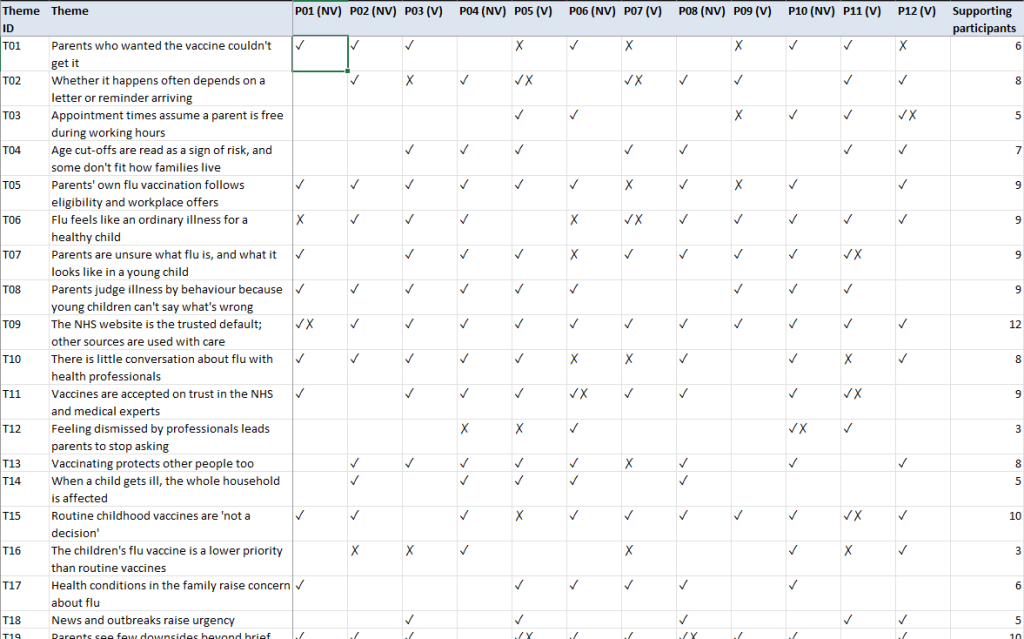
And yet again, I’m quite impressed with the output. The theme file has the themes themselves, their strength, supporting evidence and again, some sheets I didn’t think of. For example, this at-a-glance summary of the themes.
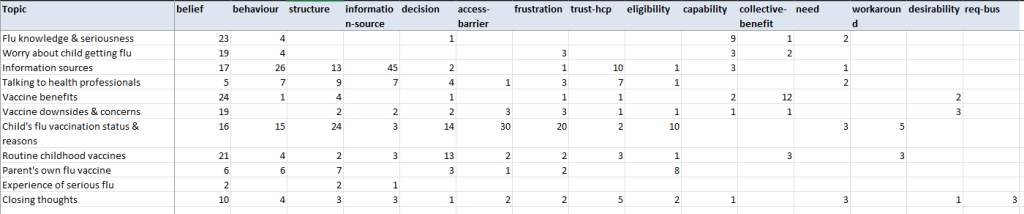
Or this summary of topics by tags:
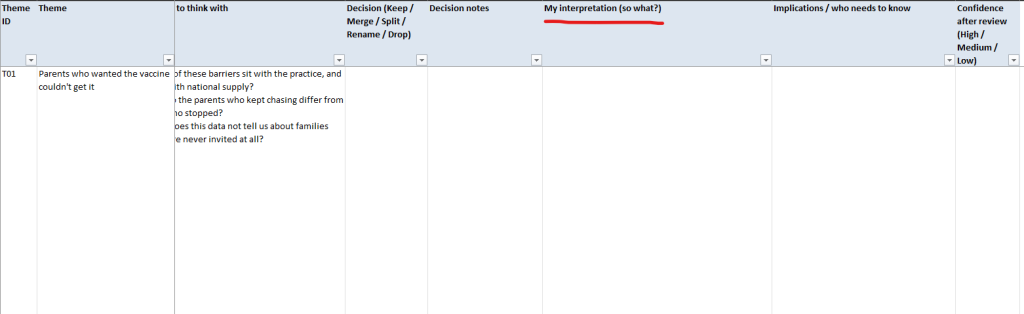
Crucially, and at my request, it left the following columns for the researcher to complete unassisted:
Reporting
The final step is to compile a report. This is where things get particularly interesting. My personal view is that reports are boring. Over the years researcher tried everything to make them more engaging with varying degrees of success. We’ve added videos, gifs, “a day in life” and many more storytelling devices. To no avail. The reports get read once and filed away somewhere never to be seen again.
Producing interactive HTML reports with Claude code, on the other hand, is quite easy and I hope will become the new standard for UR reporting.
You can do so much with an HTML report. You can stick it into an LLM Wiki to become a knowledge base. You can put it online and share it with anyone. You can turn it into a page or print it out. The possibilities really are quite varied.
Even better though, if you have a Figma MCP available with your corporate design system. Then every report will be consistent and professional.
Anyway, enough philosophising. This is the result.
https://artys.fun/round-1-report.html
Here’s what I like about this report.
Clicking on any evidence in the insight takes you down to the original excerpt. Traceability!
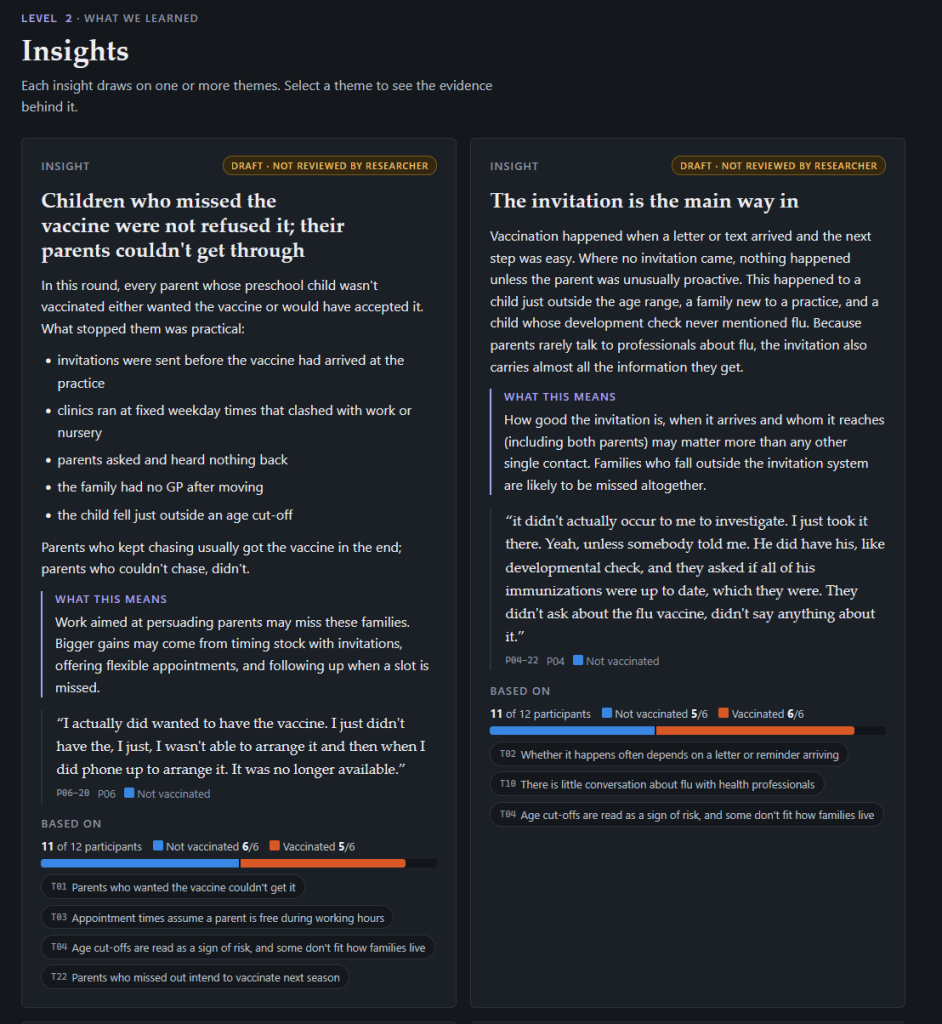
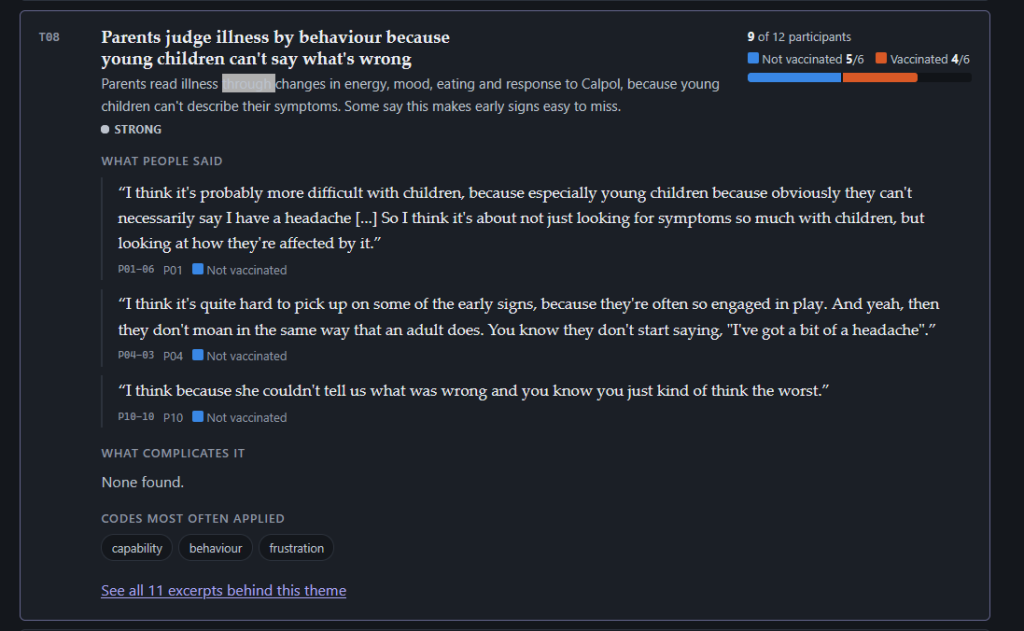
Clicking on a theme expands it. This allows people to interact with the data.
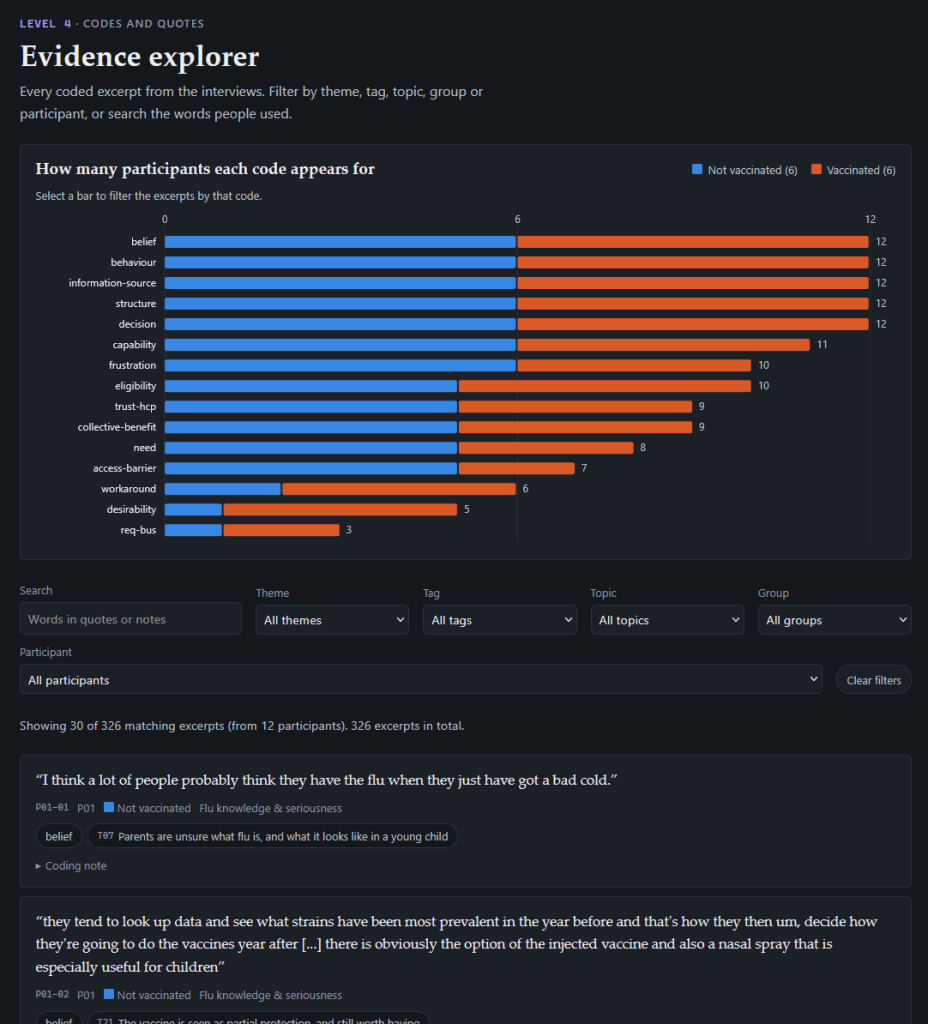
This gorgeous evidence explorer area with a search box, filters, and fun interactive elements.
Discussion
I am impressed.
Things have moved on from the days of sticking transcripts into ChatGPT and asking it to find themes. We can now build mini-repositories of knowledge for every project we do and share them with stakeholders.
There are obviously some limitations and assumptions. For example, I didn’t have time to do a proper quality check or spend the 2-3 hours (recommended by Claude!) on the thematic analysis.
Why your job is safe
This is so important it deserves its own heading. I want to make it super clear. Someone who is not an expert in their field would not be able to produce the same output.
It was me who put in the researcher interventions. It was me who added the QA step. It was me who wrote the instruction to catch any non-anonymised data. It was me who put in countless quality controls and tweaks in the workflows that allowed the model to be so detailed and accurate… and most importantly trustworthy.
If the old adage of “shit in shit out” is true then your job is definitely safe. To go x10 faster and better and bigger with AI, you still need the expertise, taste, and human creativity to make it happen.
Next steps
This is a proof of concept only but I can’t wait to find an opportunity to use it on a real project.
If you’re curious, check out the full project on my GitHub: https://github.com/ArtySemenov/ur_agent