Tag: AI

  • ROI of Human Centred AI

    ROI of Human Centred AI

    Disclaimer: Human-centred AI is a huge field that combines ethics, sutainable development, technology, some pretty advanced computer science, and more. We’ll be talking about the design side of things. AI was used to conduct research for this piece and find sources and facts. All words are my own.

    I’ve seen some terrible implementations of AI in firms. I mean truly, truly awful. Imagine using a proprietary AI—a simple GPT wrapper with custom instructions—but for some reason the business decided to build its own front end for it. Now imagine that same firm blocking access to the usual AI tools like Gemini, OpenAI, Claude, Perplexity, and everything in between. Now you’re stuck with an inferior model (Gemini 2.5 Flash, for example) that lives in a terrible proprietary interface.

    You can access the chat history but you can’t search it. There is a saved prompt library to save time but you can’t make your own to suit your needs. There is also something called “agents”, which are like Gemni Gems or OpenAI custom GPTs, but again you can’t make your own. The proprietary AI constantly cuts off long responses and you have to re-run the prompt by specifying “continue from bullet point #3,” which costs tokens and your own valuable time.

    Frustrating, isn’t it? Shouldn’t happen in 2025, right? Well, you’d be surprised how often this happens.

    We could dig into the phenomenon. Why do companies insist on building shitty AIs wrapped in shitty UI? Fears about security, reputational risks, business objectives, all that isn’t that important for this article. It just happens and it sucks. Let’s try and fix it.

    I can’t believe I’m saying this in 2025 but the secret sauce is involving your users at every step. Welcome back to 1982. Blade Runner is in the cinemas, anthropomorphising the humanity’s fear of advanced AI. IBM, already a computing giant, is democratising technology by putting a computer on every desk. Michael Cooley writes a short book called “Architect or Bee? (The Human Technology Relationship)” in which he coins the term “Human-centred Design” for the first time.

    The idea was simple: the technology should be designed to enhance human capabilities, creativity, and problem solving, rather than simply replacing human effort or reducing complex tasks to simple, repetitive actions. The idea endured for 43 years and is now central to the emerging field of Human-Centred AI.

    Our personal boulder of Sisyphus

    So why then do we keep banging our heads against constant lack of investment, lack of resources, lack of buy-in? I think of Design and I think back to the countless LinkedIn posts and Reddit threads bemoaning the challenges we face in getting buy-in. Design is routinely deprioritised, understaffed, underresourced, and underappreciated. Designers go about their lives championing, advocating, getting alignment, getting buy-in and getting shut out of big strategy meetings.

    The reason is as cynical as it is simple. The lack of buy-in is due to the lack of tangible benefit. Human-Centred Design is still seen as a naive, idealistic philosophy, rather than valuable part of the process. McKinsey can write a thousand reports on the business value of design, no one will listen.

    Framework for Human-Centred AI
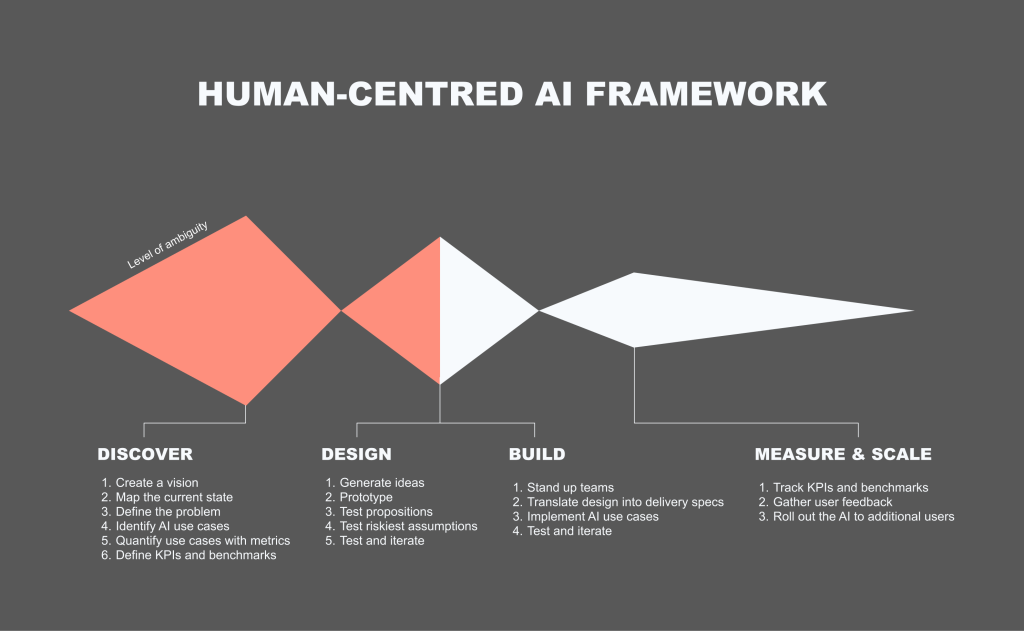
    I’m not re-inventing the wheel here. You might’ve seen variations of this framework everywhere. Double-diamond, tripple-diamond, Alpha-Beta-Live, Imagine-Deliver-Run… the list goes on. The point is that I’m proposing specific methods and activities within each “diamond” that are unique to designing AI products. Read on.

    Discover

    1. Solve an actual problem

    Do. The. Research. Talk to your users. See what their problems actually are. Not doing so is akin to a general sending in his army without reconnaissance. Companies just slap AI on anything these days. That inevitably fails unless you solve an actual problem worth solving with AI.

    2. Pick ambitious use cases

    AI can do a lot of useful stuff. It can summarise, pull documents, generate content. From talking to your users you’ll have a good idea of what they need. Prioritise the use cases and pick an ambitious one. No point in solving small problems, right?

    3. Define KPIs and benchmarks

    I like a good old fashioned planning workshop. There is a lot of data out there. Just sit down and do it, however long it takes. A day, two days, a week. It doesn’t matter. If NASA engineers can meticulously plan out 10,000 single points of failure and plan contingencies for each one — so can you map out some KPIs and benchmarks. This is key. The more specific and granular, the better. For example, “we want to improve efficiency of annual reports” is terrible. “We want to reduce the time it takes to produce an annual report from 40 hours to 4 hours, 95% accurate pre- and post- human audit” is much better.

    Design

    1. Design with users and iterate often

    This is also not new. Brainstorm, test, iterate. We’ve been doing this for 40+ years. I usually start with rough concepts, progress to low fidelity prototype (little more than interactive powerpoints), and only then—as the ambiguity reduces with each iteration—move on to fully clickable or functional prototypes.

    2. Measure KPIs early

    Measure whatever you can measure with prototypes. There are tools to tell you how successful a usability test was: System Usability Scale, my own AI Experience Score (AES), UX-Lite, and many more. The key message is to measure qualitatively to begin with. Forget automated AI benchmarks, we’re not building new models here.

    Build

    1. Start small

    Build quick spikes, functional prototypes, show them to users, get feedback. Start small and scale up. 5 users, 10 users, 100, 1000… and so on. Here’s a cautionary tale I’ve seen across multiple large organisations: teams work in isolation on some proprietary AI tools, teams release their creation to the wider company, the AI tools performs poorly, consultants are brought in to figure out why and create an adoption strategy that’s already build on shaky foundations. This expensive mistake would’ve been avoided completely with a robust ‘test and iterate’ cycle or a closed Beta to gather feedback.

    2. Continue to measure KPIs

    Continue measuring. Perhaps now we can use AES quantitatively, include analytics. The more data you gather the better. To expand on the pattern I described above: an AI tool is released, adoption and engagement are poor, no one knows why. Consultants are brought in but no usage data or user feedback is available. Consultants are forced to run expensive research to understand why.

    Scale

    1. Bake in feedback mechanisms

    Analytics feedback is great but it won’t tell you why people are doing what they are doing, or what exactly they are frustrated about. We had a discussion about this with a client just a few weeks ago. They saw high drop-off at a certain part of their journey. It was a form field on a certain page during onboarding. The drop-off spiked there and no one knew why. During interviews it turned out that that particular question had nothing to do with it. The culprit was the form field below, which was unusable and unaccessible. Analytics data will only tell you so much, user research is the thing that will help you pin-point the problem.

    2. Measure ROI

    This is where we get to the meat of the matter. Hopefully you’ve been collecting data and measuring progress this entire time. Now it’s time for that presentation back to the board. Let’s talk more about that in the next section.

    Measuring ROI

    I love the Google HEART framework. It ties subjective terms like “happiness” with objective measures, like “satisfaction scores.” It also allows you to track the impact of design on the bottom line. You can read more about the Google HEART framework here.
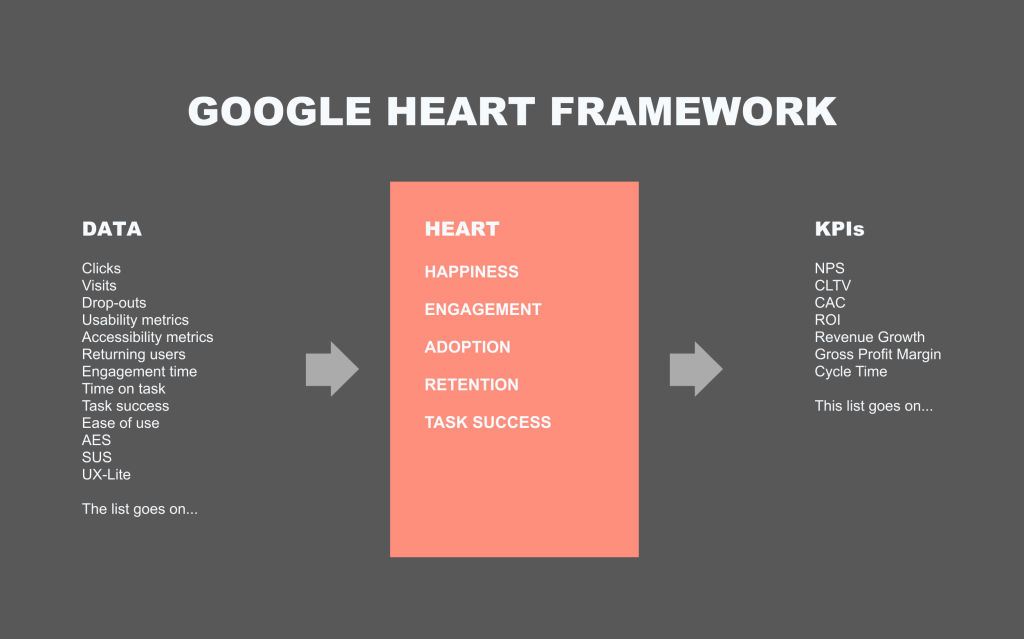
    I’ll give you an example. We were building a new product. I called in a workshop. In it we had representatives from design, product, technology, analytics, and data science. We went through the exercises and design ended up being responsible for “Happiness.” We measured it by taking our overall satisfaction score, which we measured with usability studies and contextual surveys on site. I aggregated a whole bunch of various usability metrics into an overall Happiness score, which was displayed on the Google Analytics dashboards for the whole business to see. The data science team then used this aggregated score to measure its impact on a) downstream KPIs (e.g., CLTV) and b) the gross revenue. For the first time we could improve something on the site and see that, for example, it resulted in a 2% uplift in revenue. This was huge. The principle is the same for AI. Plan the metrics in advance and find a way to tie them to the bottom line. Suddenly all ROI calculations become a lot easier.

    Conclusion

    If you want to succeed in this AI race we’re seeing, then a Human-Centred approach is what’s going to get you there. Start with a vision, speak to actual users, map out the whole process, test and iterate often, plan KPIs in advance and measure them relentlessly throughout. Let’s avoid a future where companies pour money into crappy AI that benefits no one.


  • Education personalisation

    Education personalisation

    Note: I’m unable to share original designs for this project due to client confidentiality.

    Situation

    A national higher education admissions platform provider’s ambition is to leverage data and AI to help students decide on a course they will study. Legacy systems, a non-profit status, and complexity of the topic—courses, course derivatives, course features, the wide range of available institutions, and the need to remain in the role of a neutral advisor—prevented them from achieving this ambition.

    Previous discovery identified Salesforce Personalisation and Marketing cloud as viable options but the level of ambiguity and complexity was still high. The team was brought on to prototype an illustrative solution showcasing the art of the possible. Past efforts missed the mark, either focusing too heavily on technology, or not providing the necessary clarity for the client to move forward.

    Task

    Our task was two-fold:

    • to create a non-functional prototype for a single use case where a student might know the broad topic they’re interested in but is not familiar with the intricacies of the subject; and
    • to create user journey map that takes the student from initial registration to the final application.

    Action

    • Conducted desk research to examine existing user research data and Salesforce data architecture discovery.
    • Co-facilitated an in-person design thinking workshop. The workshop was split evenly between visioning and ideation to help reach alignment and reduce ambiguity.
    • Designed a clickable prototype in Figma leveraging Salesforce features, previous data architecture discovery, and existing qualitative user research to identify user needs and behaviours.
    • Leveraged generative AI throughout as a thought partner and to produce fast Figma Make mocks that helped reach alignment quickly.
    • Introduced innovative interaction models to explore courses, subjects, and providers to 16-17 years olds and aim them in exploring and discovering new fields of study.
    • HECoS codes were used in conjunction with Generative AI to make connections between courses and help students navigate ~40,000 courses from 200+ providers.
    • Gamification principles were used to create an engaging onboarding flow for students.
    • Salesforce Personalisation engine was leveraged to passively build affinity and certainty scores and to surface content based on them.
    • Tag clouds and node diagrams were used to help students navigate subjects and discover associated areas of study (e.g., Biology -> Microbiology or Biology -> Immunology)

    Result

    The prototype, designed collaboratively with the client, will be evaluated with real students by the client’s user research team early in 2026.

  • A B2B Provider Portal

    A B2B Provider Portal

    Note: I’m unable to share original designs for this project due to client confidentiality.

    Situation

    A global healthcare client had the requirement to design and launch a rebate portal quickly. The portal’s functionality was simple: providers upload sales data each month and the client’s finance team processes this data and pays rebates based on the volume of packs, repeat prescriptions, and other factors.

    Task

    I was the lead product designer on the project, working with cross-functional colleagues to design and launch the portal. My responsibility was to manage a small team of designers to turn the client’s ambition into a usable, useful, and accessible solution for providers and back-office administrators to process sales data.

    Action

    • Facilitated multiple visioning and ideation workshops with client leadership to gain alignment and consensus
    • Worked across geographies, collaborating with teams in US and India
    • Created information architecture and service blueprint of the full end-to-end experience
    • Navigated regulatory complexity around user research and created several proto-personas from available data
    • Improved the proto-personas by analysing 17k forum comments with Gen AI, NLTK, and scikit-learn Python libraries
    • Navigated ambiguity while building a high performing culture within the design team
    • Worked cross-functionally with developers and architects, inputting into data architecture, writing Jira tickets, and working with QA to track and prioritise defects

    Result

    The provider portal was launched to the initial pool of users (20 providers) in January 2025 and was soon scaled to the full 20,000 user base. The designers were rolled off the project by then but I heard positive feedback from colleagues close to the project. On top of that I received stellar feedback from the client and my direct reports for reducing ambiguity, using innovative methods to conduct proxy research (in the absence of real research), and for building a great team culture.

  • What is Human Centred AI?

    What is Human Centred AI?

    tl;dr: Human centred AI (or HCAI) is a paradigm, similar to human centred design, that contains methods, tools, and principles to ensure AI is designed with humans at its heart, that it’s usable, accessible, safe, and trustworthy. It’s aimed to give designers, researchers, technologists, developers, entrepreneurs a framework to achieve these goals.

    Note: This article is about design and written by a designer. I don’t pretend to know anything about actually developing AI models or even AI products. I do know how to make great products though.

    Why is Human Centred AI important?

    Let’s start with a short story. Your company decides to build a proprietary GPT wrapper that’s secure and trained on your company data. They go ahead and build it and for some unexplained reason no one is using it. It’s down on all metrics and people still insist on using OpenAI or Google variants on their phones rather than engage with the tool your company spent millions developing from scratch.

    What’s going on?

    Eventually someone somewhere decided to do some user engagement and find out. Turns out that people hate it. You can’t edit your prompt, you can’t stop the system from generating its answer mid-flight, and the output it does produce is riddled with errors and is probably a bit racist. Most infuriatingly, it doesn’t even solve the user need for fast, reliable answers about your company policy.

    Oh no! Should we have engaged with users from the start?

    Let’s look at another side of the spectrum. Human-centred designers and researchers come on scene early. They run workshops with stakeholders and users to reach consensus on what the system should do, find all the current frustrations people are experiencing, and actually it turns out that no one has any issues with getting accurate answers quickly. The real problem is in the minutiae high-effort tasks, like doing desk research or consolidating multiple reports into one summary.

    The scope is tweaked, some money is saved, and the team proceeds to build a focused, single purpose chatbot that does desk research and writes research summaries.

    The team puts in clear measures that show the product is moderately successful and saves people a bit of time every day. Everyone is happy.

    What the research is saying

    In our previous research we spoke to several individuals around Manchester area to understand their usage of generative AI at home. The main theme was that people use it for small and low-risk tasks. Finding recipes, writing short, fun poems in another language, writing a complaint email, that kind of stuff.

    In other, “real” academic research HCAI is all about developing models that don’t kill us all or turn the world into a dystopian Matrix-esque nightmare. There are things there we can adapt for our purposes.

    There is a lot of academic writing on the topic out there. I checked. Most of it deals with the development of AI, but some of it is useful in the design context.

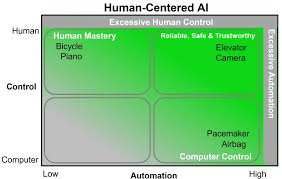
    Ben Shneiderman wrote Human Centred AI in 2020 and an updated edition in 2022. It described the need for involving humans in the AI development process. However, it also showed several frameworks for AI-Human interaction. Like this one:

    It shows the level of automation and control over various objects. When designing products, it’s worth keeping in mind features that go into the “Excessive” buckets. That GPT wrapper I described earlier and that you couldn’t stop? Excessive automation.

    In another paper, Xu Wei proposes a methodological framework that’s rather complicated and geared towards developers, but it proposes several principles, that I adapted in our work at Deloitte.

    Human centred AI principles

    Principle 1: Usable

    The AI must be usable. Duh. You ever used an AI tool that was a pain to use? I had this experience with many an “internal proprietary AI tool” across industries and clients. You want to upload a document? Click on this button. Then that button. Then wait. Then click to “Add file to chat”. Disgusting.

    Methods to consider

    • Usability testing
    • Accessibility testing
    • Co-design sessions

    Principle 2: Useful

    You ever used an AI tool and thought, “why is this here?” Remember the failed WhatsApp chatbot? I asked it, “why are you here?” and it told me it’s there to answer questions and be a buddy. How is it different to clicking on an app in your phone then? No different. What’s the USP? It’s in your WhatsApp. We are obliged to design tools that actually answer a need. A product without a need is just an expensive failure.

    Methods to consider

    • Visioning workshop
    • Process mapping
    • Service blueprinting
    • User journey mapping
    • Prioritisation frameworks (ICE, MoSCoW)
    • Decision trees

    Principle 3: Trustworthy

    How do you know you can trust the chat’s output? We know generative AI can be biased and error prone. There are ways we can increase this trust. There is a neat list of AI patterns out there on the Shape of AI website. Here are some of my favourite that I’ve used in the past.

    Patterns to consider

    • Caveat (AI responses can be inaccurate)
    • Consent (Do you consent us using this data for training?)
    • Watermarks (AI generated)
    • Showing your work (not on Shape of AI but Perplexity and GPT5 are doing this now)

    Principle 4: Scalable

    Scalable can relate both to the techy under-the-hood but also to the product itself. A product that requires constant monitoring and is prone to errors is not scalable. A product that fits seamlessly into users everyday workflows is. A workflow is predictable, debuggable, and scalable. A loose cannon agent that makes decision on its own is none of these things.

    Patterns to consider

    • Workflow mapping
    • Business process mapping
    • Service blueprinting
    • User journey mapping

    Principle 5: Responsible

    Oh ethics, my favourite topic. How do we make sure the AI isn’t bad? How do you make it ethically sound but also use it in a safe and ethical way? There are lots of issues there. The black box problem, the biases, the errors, the AI psychosis, people using AI in unethical ways to fudge experiments with synthetic data… the list goes on and on.

    Mitigation strategies to consider

    • Human review of training data
    • Publish guidelines and policies for safe AI use
    • Human review of outputs

    Principle 6: Empowering

    Closely related to it being useful, this goes one step beyond. What’s the point in creating an expensive tool that doesn’t only help people but also empowers them to be better? It’s a debate between augmentation and automation. Automation makes a task easy, augmentation allows people to do things they never thought possible. To do this you really need to understand human needs and find ways to create a symbiotic relationship.

    Methods to consider

    • In depth interviews
    • Co-creation workshops
    • Service blueprinting

    Principle 7: Controllable

    My pet hate. Just add that “Stop” button in! It goes beyond that of course. How do we create an AI that keeps the user in the driving seat? That doesn’t do anything unexpected but also has enough automation to be useful? It’s a fine balance and goes back to Ben Schneidermann’s automation vs. control diagram above. There is a beautiful blog that goes into a lot of detail on this topic here.

    Methods and patterns to consider

    Conclusion

    Human centred AI is the next evolution of human centred design. It’s not a paradigm shift, per se, but more of an update for the age of AI. The tools are generally similar: talk to users. If you’d like to dive into the topic further here’s a list of reading materials that are worth your consideration:

  • On synthetic users

    On synthetic users

    Can we talk about synthetic users? We, experience designers (or researchers; HCD is a big umbrella), all know they’re a bad idea… but why? And how do we convince our business colleagues without sounding like the whole field is in the “AI is gonna take our jobs” panic?

    While slighly bored during what Romesh Ranganathan on BBC2 called “crimbo limbo” I decided to play around with synthetic personas. It was either that or clearing out the garage, don’t judge. Here’re the results. Spoiler, they’re not fantastic.

    I ran two small scale experiments. One with qualitative data from interviews (thank you Timothy Price from Newcastle University for making the anonymised transcripts available for download!); the other with no data beyond some basic demographic data and assumptions.

    Experiment with data

    I created a Custom GPT with 10 interview transcripts as a base. The interviews were around parent’s knowledge of the flu and their thoughts about vaccinations. I asked it to reply as a parent in first person and always present its opinions as its own, using words like “I think” and “I feel”. I then fed it various service concepts ranging from benign (digital service to book vaccinations) to downright scary and unethical (let’s monitor a specific group of people). The persona was overjoyed to use the service, completely ignoring the fascist undertones. Not once did it say anything critical.

    On the plus side, it was very faithful to the transcripts and had extra detail to expand on if I asked a follow-up question. Its main concerns were privacy, security, and accessibility.

    Conclusion: your design a burnt toast and it’ll still hail it the best thing since sliced bread. I wouldn’t use it for anything beyond basic data retrieval from the transcripts, and even then I’d double check everything.

    Experiment with no data

    I created a similar Custom GPT with the same system prompt but it was directed to use its general training when coming up with responses. Funnily enough it didn’t make much difference. It thought that a government monitoring service for a specific ethnic group was a splendid idea.

    Its main concerns were privacy, security, and accessibility.

    Conclusion: way too generic, and oddly similar to the previous bot.

    Discussion

    It seems that no matter what data you throw into it, the responses will be generic and overly positive. So next time someone at a conference tells you that their company makes synthetic personas powered by a bazillion data points from all across the internet — don’t believe them! Those bazillion data points will not make the persona any better, they’ll just add a bazillion more points of failure, and tell you to think about privacy, security, and accessibility.

    There are perfectly valid reasons to have a digital twin system simulating the real world in real time. This is what synthetic users are, really. However, people are infinitely more complex than an electric turbine or even a space rocket. AI might make good estimation and have a bazillion data points to draw upon, but—and it’s a big ‘but’—would you trust AI with your space rocket?

    Therefore, my point of view is that synthetic users are shit. AI has a thousand more useful use cases that make the world a better place.

    Notes

  • Knowledge management in the era of AI

    Knowledge management in the era of AI

    I’ve been thinking about this over the weekend. We spent the last two years feverishly trying out approaches to make research analysis easier for ourselves. First we tried simply dropping in all our interview transcripts into the chat and let it analyse it. When that didn’t work, and honestly resulted in more hallucinations than anyone thought possible, we switched tact and tried to chunk the data. We experimented with aligning transcripts to interview questions. We even, at one point, added interview transcripts to a CSV file, pre-processed it, and created a JSON output to make them more “LLM friendly”. Every time something was missing.

    LLMs are inherently black boxes of magic. Stuff goes in, complicated statistical stuff goes on, AI slop comes out. Sure, they’re useful in their own small way to write stuff that sounds like it was written by AI, or summarise some high level stuff.

    Slight tangent. I recently read some _insights_ created by an LLM model from a bunch of transcripts. Turns out that data scientists and analysts _need_ to process data. Blew my mind.

    Back to our black boxes of magic. The point is, no one, even the developers, really knows what’s going on inside that black box of an LLM. Once the training data is in, that’s it. It goes and does stuff. And that is a problem.

    How can we trust anything the LLM produces if we can’t explain it?

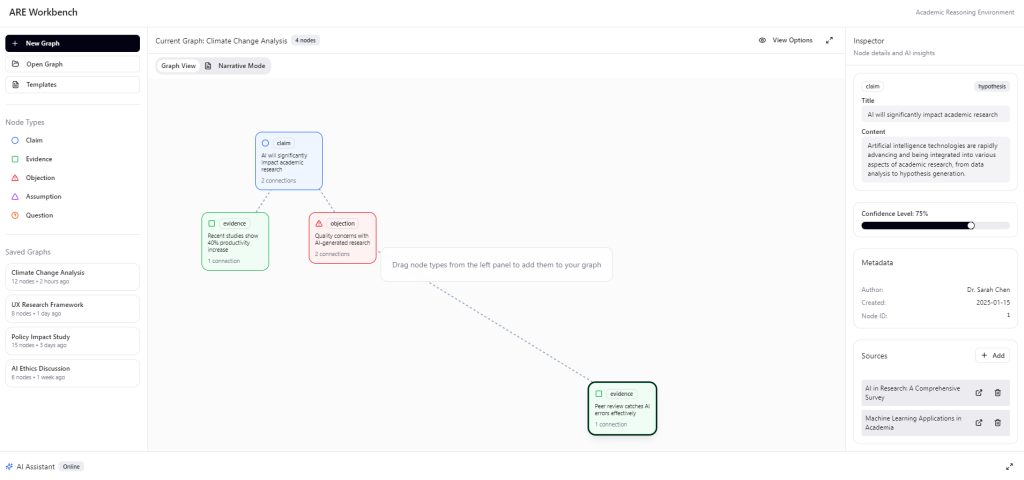
    So here’s my humble contribution to the field of Explainable AI. I present to you the first epistemologically transparent cognitive dashboard:

    Made with Figma Make

    If you’ve ever seen a debating or argument building software, it’s pretty much that. I’m not reinventing the wheel here. The difference is in who the users are. I envision mini-agents building logical strings of arguments to support any claim. Think of it as a cognitive assistant to make research more traceable. It’s AI-powered in a sense that mini-AI-agents are spinning their wheel working on a single piece of evidence at a time.

    You upload your sources, the little swarm of agents go and break your sources into pieces, process them, tokenize them, and build a shared context together. Then you, the user, can interrogate the data, make claims, ask the AI to build argument graphs to support your arguments, and so on. Suddenly we’re using LLMs to help us construct knowledge and logic, rather than mindlessly processing context windows to spit out a hallucination of what the truth might be.

    As ChatGPT sycophantically praised my idea as a paradigm shift in human cognition… yeah… no… I still couldn’t help but think how neat it would be to have traceable argument chains that show how the LLM came to this or that conclusion.

    Perhaps we can use it in research repositories, perhaps in academia, policy, strategy. Perhaps we can stop the decline of critical thinking in schools by saying, “cool, you want to use AI? Great! Bring me an AI written paper with epistemological transparency. Show me how you got the answer!” Wouldn’t it be neat?

    You could dive into sources to inspect citations, contradictions, and epistemic status of a node. You could mess around with all sorts of fun meta-data that your helpful swarm of agents helpfully made for you. It’s not really NotebookLM, or Obsidian. It doesn’t just take your notes and spits out things it knows about them. It’s a structured reasoning tool that makes LLMs less of a black box of magic.

    So… I guess this is a call to action. It would be great to connect with researchers, engineers, just people who care about epistemic transparency of LLMs. Honestly, if I could build this I would use the crap out of it as a research repo and analysis tool.

    Drop me a line! We can get the MVP out in no time 😉

  • On empathy in customer service

    On empathy in customer service

    We did some research recently. We asked participants to recount a particularly frustrating experience with customer service. Almost every single one said, “I felt like they didn’t listen.” and something in the vein of, “I need to know that they got my back, that they understand.” Isn’t it quite profound? Don’t you just want to call customer service and have someone tell you that everything is going to be okay?

    Empathy is a very human concept. It’s important for us to know that the other person understands what we’re going through. “Hey, I’m sorry, that sounds frustrating!” and suddenly everything is just this little bit better. So why don’t we have this in customer service? A business function that’s designed to make customers’ lives better?

    Imagine my surprise then when most participants then proceeded to say that they don’t actually don’t care much that they don’t speak to someone as long as the thing they came here to do is done. I understand the sentiment. Sometimes you just want to get a thing done.

    There is nuance of course. Some things you just need to speak to a person about. Especially when it’s something complex or sensitive.

    So the point is this:

    Speaking to a human is important, but not as important as getting shit done.

    Great, Arty, thanks for this pearl of wisdom. So what?

    The so what is that I see a lot of companies make it impossible for customers to get shit done. They add pages and pages of searchable help articles that are as ignorable as they are useless. They add inefficient systems that take customer information only for the customers to have to say it all again when they get to an agent. They make agents life hell with 17 (yes, we heard this in our research too) tools to search for information.

    The so what is that businesses need to prioritise getting shit done over anything else. Name change, renewal questions, basic stuff, it can all be automated. You don’t need an offshore contact centre. You don’t need to spend millions on training. You just need to make it easy for people to achieve their goals, and if that goal is to speak to an agent, then so be it.

    How do we make it easy for people to achieve their goals? That’s the million pound question. Every business is different. Perhaps a talented (hint hint) designer can help you here. You could introduce Agentic AI, you could add a self service flow to make easy changes to the account, you could make your human agents’ lives simpler by automating parts of their workload. The solutions are many, the question is how do we find those solutions.

  • How does AI actually impact our daily lives?

    How does AI actually impact our daily lives?

    If we take away the incessant torrent of AI news, articles, panicked Reddit posts, trashy Tik Tok videos, and other slosh. What’s left? How do you actually use AI in your day to day?

    Let’s start with a proud sample of one — me!

    Last month I used AI to generate some voice overs for a marketing video and an AI avatar tool to put faces to the words. I wasn’t hiding it was AI generated though, it was part of it. I’d say it’s a pretty niche use case.

    Last week I used AI to do deep research for a Request for Proposal for a client. I ain’t spending a week reviewing 140 websites about digital strategies and competitor analysis. I trust the AI to do it for me, even if it’s not 100% perfect. It saved a ton of time and all I had was to read the insights, write some human analysis as to what they mean, and stick them into a presentation.

    This morning I used AI to give me ideas on how to make my oeufs en cocotte less runny when they come out the oven. Before that I generated some character names for my roleplaying game.

    AI seems to have slipped into my day to day pretty seamlessly. I like it. It’s like having a slightly overeager information butler at my fingertips. I don’t Google thins as often anymore, as predicted by some report somewhere. I don’t spend too much time doing desk research. Is it bad? Absolutely not. Does it impact my creativity? Also no. It’s more of a brainstorming partner. I’m making all the decisions. I don’t think I ever saw it come up with a truly original idea. You’d need a human for that.

    But hey, I wouldn’t call myself the typical user. I actually work with AI for a living, kinda. Let’s take another, more robust sample. Let’s ask some real people how they use AI and how it impacts them. Conveniently we did some interviews on just this topic back in March. Here’s what we came up with.

    People use AI to write letters, plan holidays, and generate emails

    Big insight (yes, sarcasm). Most peoples’ use cases kinda align with mine. AI has become a part of our lives in a completely expected and boring way. It removes the minutiae of having to do boring stuff.

    AI can be your lawyer, wedding planner, can help write a complaint that actually gets heard. It opens up all sorts of opportunities. Listen to this. One participant was telling us about a legal battle they had with a company.

    > When I was writing my email to the [company]. I did, like, so that it sounded legally sound. My housemate did put it through a ChatGPT type thing. So I think it’s almost like, interesting to think about the fact that it’s not only like companies who are using it, but, like, people themselves, I imagine, when they’re having complaints.

    Isn’t it great? You have a lawyer in your pocket now! It’ll get a bunch of facts wrong, and hallucinate another bunch, but boy can it write a good complaint.

    People use virtual assistants like Siri, Alexa, and Google Assistant for tasks, reminders, checking weather, and controlling home devices

    Aha! Got you! I never said we’ll be talking about generative AI, did I?

    But seriously, this finding points at an interesting difference between how we—designers, researchers, etc., working in tech—think about AI and how Mrs. Smith from down the road thinks about it. Alexa is still the pinnacle of AI technology for many people.

    Conclusion? Quite a few actually.

    Firstly, you’ll probably need to explain generative AI to your gran when it comes to her Alexa.

    Secondly, when it does, it’s going to be fantastic for older people. We already know that older folk sometimes use Alexa to alleviate loneliness. Imagine if it could talk like a human and provide some emotional support from time to time like ChatGPT does? For this generation the AI revolution won’t be about making hyper-realistic promo videos. It’ll be about a familiar voice becoming that little bit smarter. I quite look forward to this one.

    People use AI to translate and learn languages

    One participant used ChatGPT to surprise his Danish wife. His granddaughter used it to write a poem in the style of William Shakespeare for school and it gave him an idea to do something similar but in Danish. Isn’t it lovely?

    AI is opening a whole new world of languages for us. There are already demos of real-time translation (similar to what Google Translate does), but the added value of learning the language is pretty neat.

    Conclusions? There is something about making localisation easy, perhaps enriching simple translation with an element of learning is a neat idea. Ultimately though, AI is democratizing the connection and lowering the barrier to not just understanding but connecting with other across linguistic divides.

    Some conclusions

    So after sifting through the hype and looking at how we actually use it, what’s the real story here?

    AI has clearly become a part of our lives in a very subtle and non-invasive way. This “Boring Revolution” is actually kinda nice. I’m sick and tired of the AI hype online. How it’s going to take our jobs and disrupt our very way of life… and other dramatic predictions.

    Instead I’m coming to think of it as the great enabler. It’s not about sentient robots taking over or all designers losing their jobs. It’s about people gaining superpowers—like sifting through the noise and getting the information you’re actually searching for, or writing a near-perfect complaint letter, or feeling less lonely.

    This is wonderfully “boring” in a world where disinformation and AI-slosh is taking over.

    N.B.: hey, we’re all aware of the risks, but just in case you aren’t, this “boring” revolution is still very much open to bad actors. Disinformation can become quite insidious and hard to spot. Companies can learn to optimise their content to make sure they appear in AI search results. Marketing departments and bad state actors can manipulate the narrative. Imagine if ChatGPT tells your some fake news? But stop. Just stop. Let’s not think about that for now. Let us enjoy the fuzzy, cosy glow of the ‘boring’ revolution for just a minute longer.